New feature

Know exactly who did what

Every training and member action is recorded in an append-only log with the actor and the role they held. No more disputes about who removed an athlete from a training or changed a schedule.
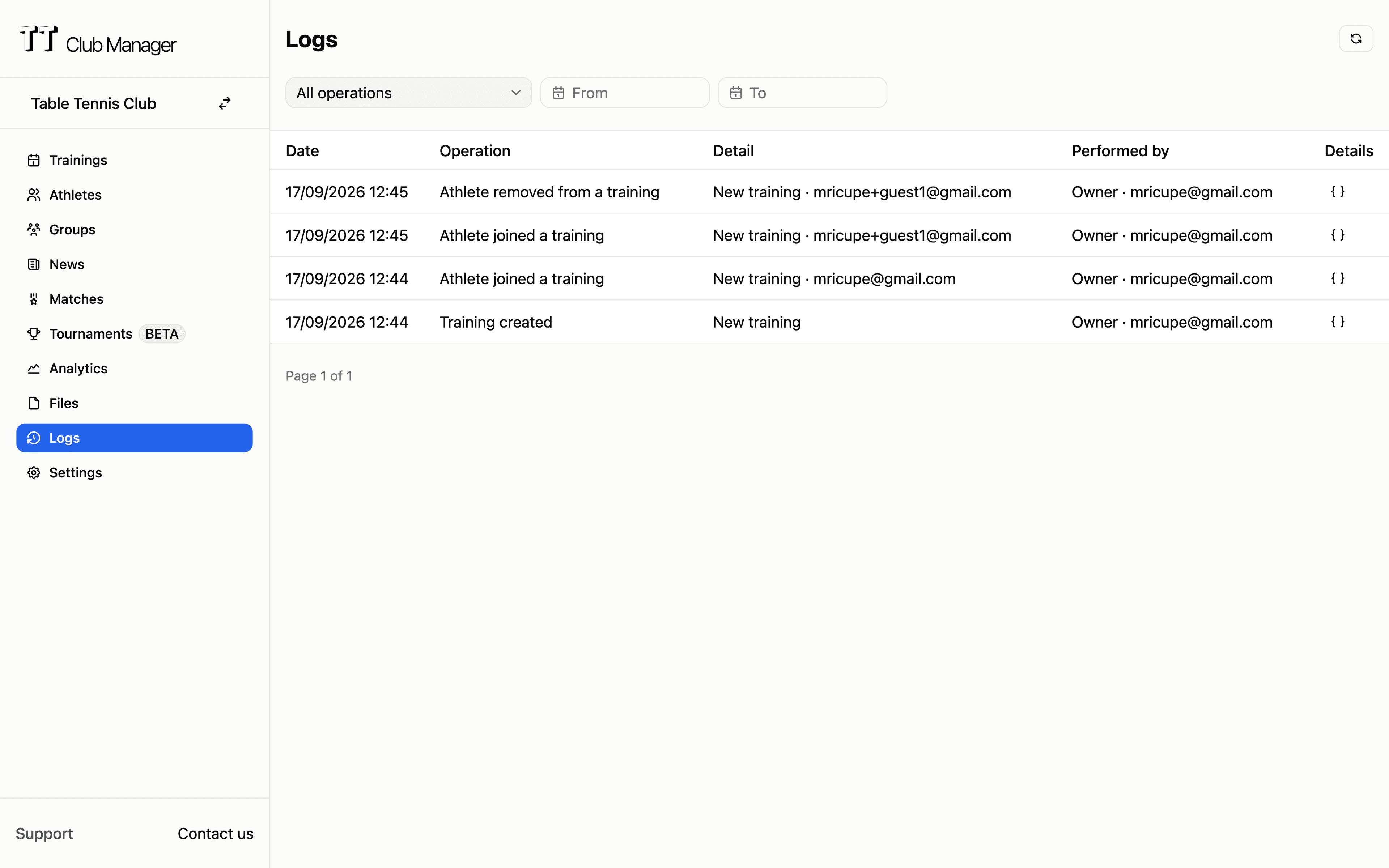
Audit log listing training and member actions with the actor and role

Append-only history

Entries are written once and never edited or deleted, so the record reflects what actually happened. A failed audit write never blocks the action itself.

Actor and role

Each entry names the person and the role they held at that moment (owner, admin, member, guest or system), a snapshot that later role changes do not rewrite.

Settle disputes

Tell an admin action apart from a member's own action: see whether an athlete was removed by staff or left on their own, and when.

Filter and inspect

Filter by operation type and by day range, page through the history, and open any entry to see its full structured details.

How the audit log works

Automatic recording in three simple steps

1

Actions are recorded

The moment a training or member is created, updated, deleted, joined or removed, the platform records the operation, the linked entities and the actor.

2

The actor is resolved

The platform looks up the actor's role at that moment and stores it with the entry, distinguishing club staff from members, guests and automated jobs.

3

Owners review

Club owners and super admins open the log from the dashboard, filter by operation or date range, and inspect any entry in detail.

Who benefits from the audit log

Accountability for the people who run the club

For club owners

See which admins changed trainings or member data, and when, without asking anyone to keep notes.

For administrators

Back up a decision with facts: who removed an athlete, who changed a schedule, who sent a notification.

For coaches

Confirm roster changes and attendance edits are attributed correctly instead of relying on memory.

For members

Know that actions affecting their registrations are attributed and traceable, protecting both sides.

Audit log comparison

See how TT Club Manager compares with word-of-mouth and manual notes

FeatureManual/Other toolsTT Club Manager
Recording actionsMemory, chat messages or paper notes
Automatic append-only log of every recorded action
AttributionUnclear who changed what
Actor email and role captured at the moment of the action
Resolving disputesConflicting accounts with no evidence
Timestamped entries that can be filtered and inspected
History windowWhatever someone happened to write down
Consistent entries retained for 14 days, then expired automatically
Access controlAnyone with the login can see everything
Visible only to club owners and super admins

Common questions

Can entries be edited or deleted?

No. The log is append-only: entries are written once and never modified or removed manually, so the history stays trustworthy.

Who can see the audit log?

Only club owners and super admins. Regular admins, coaches and members cannot open it.

How long are entries kept?

Entries are retained for 14 days and then expire automatically. This keeps the retention story simple and avoids keeping personal data longer than needed.

Which actions are recorded?

The training lifecycle (create, update, delete, periodic changes, bulk delete, week replication, join, waiting list, removal, self-leave, offers, attendance) and the member lifecycle (create, import, update, delete, role grant/revoke, group add/remove, notifications).

What is stored for each entry?

The operation type, the actor's email and role, the linked entities, a timestamp and contextual details such as the training name or member email. Raw request bodies with sensitive data are deliberately not stored.

Does it slow down normal operations?

No. Recording is best-effort and never blocks the action: if the audit write fails, the underlying operation still succeeds.

Ready to make every action traceable?

Keep a clear record of who did what in your club.

TT Club Manager

Your complete table tennis club management solution

© 2026 TT Club Manager. All rights reserved.