Feature highlight

Groups for athletes, restrictions for trainings

Categorize your athletes into groups and control who can book each training session. Exclusive league sessions and open member sessions, all from one dashboard.
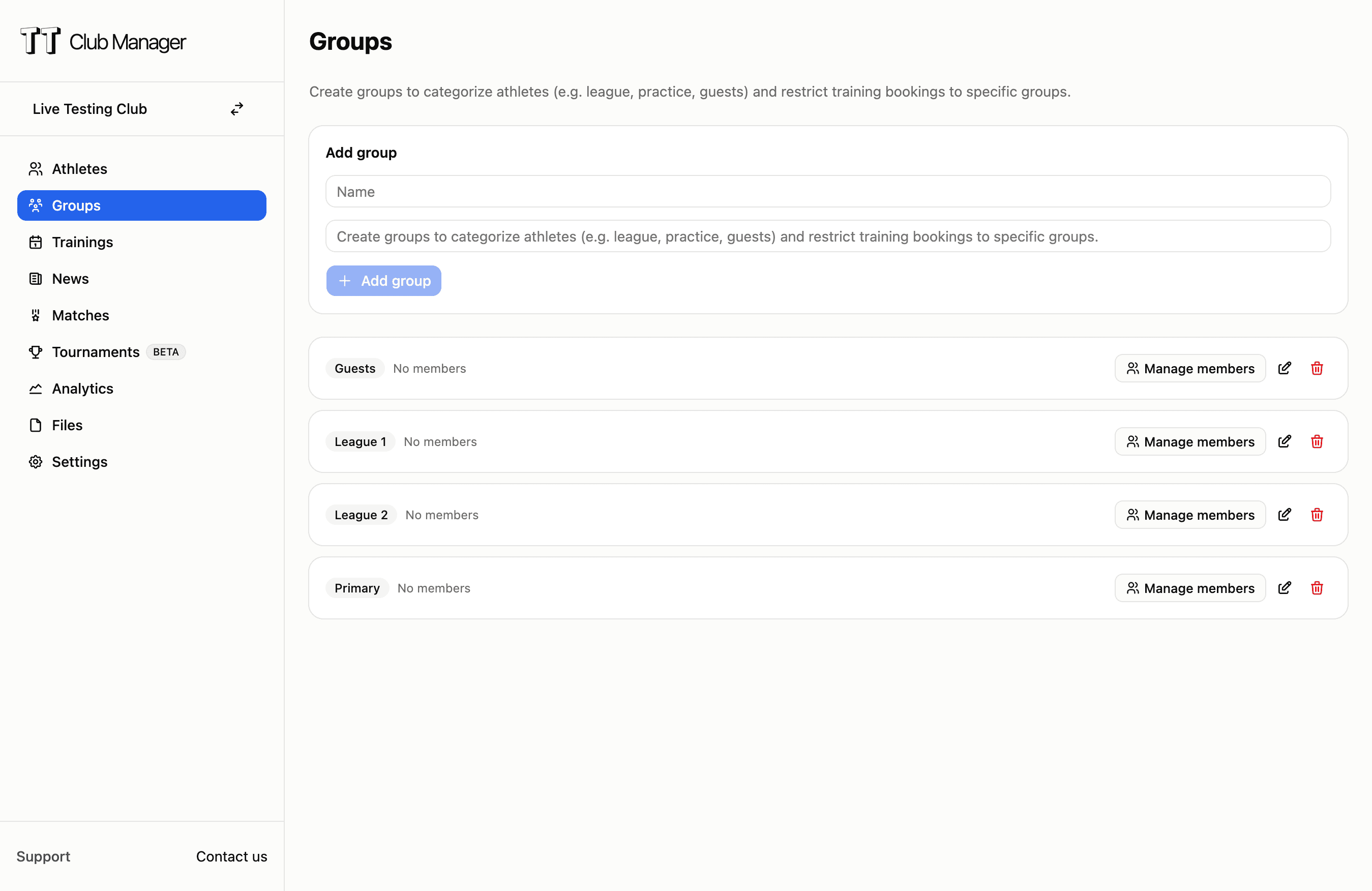
TT Club Manager groups and training booking restrictions interface

Categorize your athletes

Create groups like league, practice, and guests, and assign each athlete to one or more groups. Flexible enough for any club structure.

Restrict bookings per session

Decide which groups can book each training. Tuesday league-only, Wednesday open to all. Members see restricted sessions with a clear reason.

Admins keep full control

Owners and super admins manage groups and assignments. Admins can still place members manually when exceptions are needed.

How groups work

Three steps to organized sessions

1

Create your groups

From the Groups page, create the groups that match your club, like league, practice, and guests. Each group gets a name and optional description.

2

Assign athletes

Open a group and add or remove athletes in seconds. Search by name or email and toggle membership instantly with a clear in-group view.

3

Restrict your trainings

When creating or editing a training, pick which groups can book it. Leave it empty to keep the session open to all members.

Who benefits from groups

Built for clubs with mixed member types

League and practice split

Run exclusive sessions for league players on set days and keep open practice sessions for all members on others, without manual reminders.

Guest and member access

Keep guest players separate from full members for specific sessions, while still letting them book the open ones they're invited to.

Junior and adult programs

Separate junior and adult training times so each group books only its own sessions, reducing confusion and no-shows.

Multi-team clubs

Organize players by team or squad and restrict pre-match trainings to the right group, so capacity goes to those who need it.

Group and booking control comparison

See how TT Club Manager handles member categorization

FeatureManual/Other toolsTT Club Manager
Member categorizationSingle member role, no way to tell league from practice players
Flexible groups, one athlete in many groups
Session accessReminders and manual checks to keep wrong members out
Per-training group restrictions enforced automatically
Booking visibilityMembers book any session and find out later it's not for them
Restricted sessions show clearly with the reason
Admin oversightSpreadsheets and sub-groups to track who's in what
One groups page with counts and instant assignment

Common questions

Can an athlete be in more than one group?

Yes. An athlete can belong to multiple groups, so someone who plays both league and practice can be in both and book either type of session.

What happens to a restricted session for members not in the group?

Members who aren't in an allowed group still see the session in their list, but the booking button is disabled and shows a clear message that their groups don't allow booking it.

Can admins still add a member to a restricted session manually?

Yes. Owners and super admins can bypass the group restriction and place any member into a session directly when an exception is needed.

Ready to organize your club with groups?

Start your 7-day free trial today. No credit card required.

TT Club Manager

Your complete table tennis club management solution

© 2026 TT Club Manager. All rights reserved.